
Skip to content
Close Menu
    Facebook X (Twitter) Instagram
    Ndwompafie.netNdwompafie.net
    • Home
    • Music
      • Dancehall
      • South, East & Central African Music
      • Gospel
      • Instrumentals
      • DJ Mixtapes
    • Ghana Music
    • Nigeria Music
    • Music Videos
    • News
      • Entertainment News
      • Technology
      • Fashion News
      • Health
      • Insurance
      • Sports News
      • Gossip News
      • Local News
    Tuesday, September 8
    Facebook X (Twitter) Instagram
    Ndwompafie.netNdwompafie.net
    Home » Download Spotify Music to PC with ViWizard: The Ultimate Guide to Offline Listening
    Technology

    Download Spotify Music to PC with ViWizard: The Ultimate Guide to Offline Listening

    Ndwompafie AdminBy Ndwompafie AdminSeptember 7, 2026No Comments4 Mins Read
    Share Facebook Twitter Telegram WhatsApp
    Share
    Facebook Twitter Pinterest Telegram WhatsApp
    Download Spotify Music to PC with ViWizard: The Ultimate Guide to Offline Listening
    Download Spotify Music to PC with ViWizard: The Ultimate Guide to Offline Listening

    In the age of music streaming, Spotify remains a clear leader with over 100 million tracks. However, the convenience of streaming comes with a significant catch: you don’t truly own the music. Whether you have a free account plagued by ads and skips, or a Premium subscription that still locks your downloads within the Spotify app, getting permanent, portable MP3 files is more challenging than it should be.

    This guide explores why downloading Spotify music to your PC is complicated and how ViWizard Spotify Music Converter provides a seamless, high-quality solution for building a permanent music library.

    The Problem: DRM and Spotify’s Restrictions

    Spotify’s content is protected by Digital Rights Management (DRM). When you download a song for offline listening via the app, it’s saved as a cache file in a proprietary format. You cannot play these files in iTunes, on an MP3 player, or use them for a video project.

    For free users, the situation is even more restrictive: offline downloading is entirely locked behind the Premium paywall. This means your music is “rented,” not owned. If you cancel your subscription or lose internet access, your music disappears.

    Introducing ViWizard Spotify Music Converter

    ViWizard Spotify Music Converter is a professional desktop application designed to break free from Spotify’s restrictions. It acts as a bridge between the streaming service and your personal music library, allowing you to convert Spotify songs, playlists, albums, and podcasts to DRM-free formats like MP3, FLAC, WAV, and M4A.

    READ ALSO: Suchbegriffe als Frühwarnsystem für lokale Google-Ads-Kampagnen
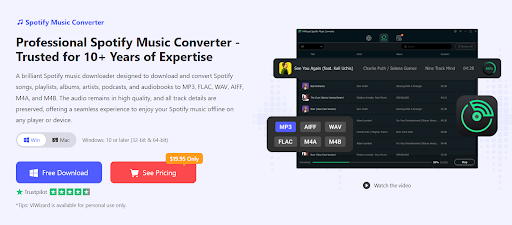
    It works with both Spotify Free and Premium accounts, making it a versatile tool for anyone looking to take control of their music collection.

    Key Features That Make It Stand Out

    Multiple Output Formats: Choose from MP3, AIFF, WAV, FLAC, M4A, and M4B to ensure compatibility with any device, from car stereos to high-end audio players.

    Lossless Quality Preservation: ViWizard maintains the original audio quality, supporting bitrates up to 320kbps. This ensures you get a studio-level listening experience.

    Preserves ID3 Tags: All essential metadata, including song title, artist name, album, and cover art, is retained. This keeps your music library organized and visually appealing.

    High-Speed Batch Conversion: With advanced acceleration technology, ViWizard can convert music up to 20x faster than real-time. You can download entire playlists or albums at once, saving you hours.

    Built-in Spotify Web Player: The software includes an integrated Spotify Web Player, so you can browse, search, and add music directly within the application without switching between apps.

    How to Use ViWizard to Download Spotify Music to PC

    Using ViWizard Spotify Music Converter is straightforward, even for beginners. Here’s a simple guide to get you started:

    Step 1. Install ViWizard Spotify Music Converter
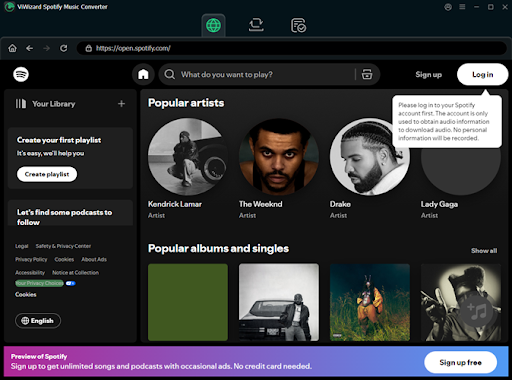
    Download and install the appropriate version of ViWizard for Windows or Mac. Launch the program when installation is complete, then log in to your Spotify account.

    Step 2. Add Spotify Songs
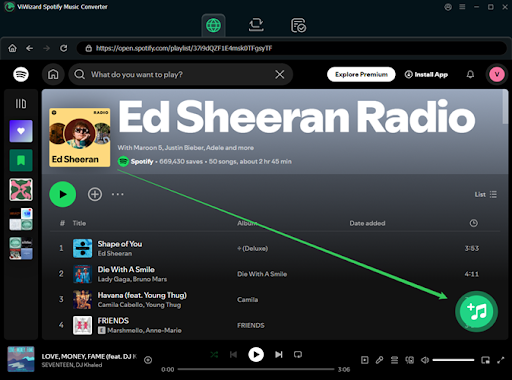
    Choose the Spotify tracks, albums, playlists, or podcasts you want to convert and click the + button to add. Depending on the version and workflow, you can add content through Spotify links or the integrated Spotify interface.

    Step 3. Select an Output Format

    Choose MP3 if you want a widely compatible format. You can also select WAV, FLAC, AAC, M4A, or M4B according to your needs.

    You can usually adjust settings such as bitrate, sample rate, output folder, and file naming before starting the conversion.

    Step 4. Start the Conversion
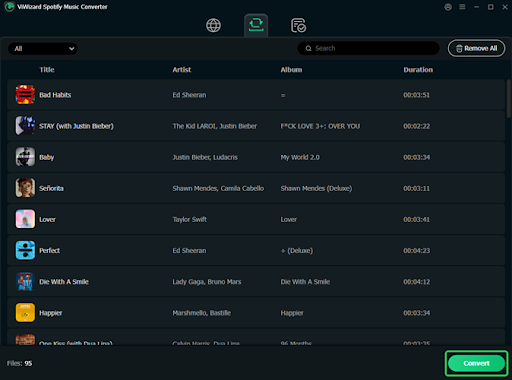
    Click the conversion button and let ViWizard process the selected Spotify content. Batch conversion makes it possible to process multiple songs or an entire playlist together instead of handling every track individually.

    Step 5. Find Your Music on Your PC

    After conversion, open the selected output folder. Your converted audio files will be available there for local organization and playback.

    Final Thoughts

    Downloading Spotify music to PC can mean two different things. If you simply want offline listening, Spotify Premium’s built-in download option is the most straightforward solution. However, if you need Spotify music as regular audio files, a tool such as ViWizard Spotify Music Converter provides a more flexible approach.

    With support for multiple output formats, batch conversion, and metadata preservation, ViWizard can help you create a more organized local music library. Always make sure that any downloaded or converted content is used in accordance with Spotify’s terms and applicable copyright laws.


    Follow on X (Twitter) Follow on Pinterest Follow on WhatsApp
    Share. Facebook Twitter WhatsApp
    Previous ArticleLady Tuff – Amela
    Ndwompafie Admin
    • Website

    Related Posts

    Technology August 22, 2026

    Suchbegriffe als Frühwarnsystem für lokale Google-Ads-Kampagnen

    Technology July 30, 2026

    How Does Solar Charging Help Outdoor Power Stations?

    Technology July 17, 2026

    RolsBet App Review: What Ethiopian Players See on Mobile

    Technology July 11, 2026

    How Forex 5 Min Scalping Works and Why Traders Use Short Timeframes

    Technology May 22, 2026

    Are Portable Power Stations Worth Buying in 2026?

    Technology May 22, 2026

    What Factors Affect Wheel Loader Fuel Efficiency?

    Add A Comment

    Comments are closed.

    Search more from Ndwompafie
    Popular Artists
    (Official Video) (147) Alkaline (90) Amerado (168) Beeztrap Kotm (91) Bisa Kdei (91) Black Sherif (105) Bosom P-Yung (89) DarkoVibes (128) Davido (139) E.L (101) Efya (89) Fameye (200) Flowking Stone (105) Jahmiel (88) Jay Bahd (115) Joey B (122) Kelvyn Boy (125) KiDi (142) King Promise (117) Kofi Kinaata (107) Kofi Mole (186) Kuami Eugene (223) Kwaku DMC (101) Kweku Smoke (154) Kwesi Arthur (229) Medikal (419) Mr Eazi (128) Olamide (84) Oseikrom Sikanii (99) O’Kenneth (130) Popcaan (125) Quamina Mp (128) Reggie (91) Remix (104) Samini (124) Sarkodie (362) Shatta Wale (745) StoneBwoy (303) Strongman (172) TeePhlow (85) Tulenkey (96) Vybz Kartel (179) Wendy Shay (118) Yaa Pono (116) Ypee (100)
    Ndwompafie.net
    Facebook Pinterest WhatsApp TikTok Telegram Threads
    • About Us
    • Contact Us
    • Disclaimer
    • Sitemap
    • Advertise
    • Terms of Service
    • Privacy Policy
    © 2026 Ndwompafie. Designed by PulsePixels Technologies.

    Type above and press Enter to search. Press Esc to cancel.

    Ndwompafie.net
    We Value your Privacy
    To provide the best experiences, we use technologies like cookies to store and/or access device information. Consenting to these technologies will allow us to process data such as browsing behavior or unique IDs on this site. Not consenting or withdrawing consent, may adversely affect certain features and functions.
    Functional Always active
    The technical storage or access is strictly necessary for the legitimate purpose of enabling the use of a specific service explicitly requested by the subscriber or user, or for the sole purpose of carrying out the transmission of a communication over an electronic communications network.
    Preferences
    The technical storage or access is necessary for the legitimate purpose of storing preferences that are not requested by the subscriber or user.
    Statistics
    The technical storage or access that is used exclusively for statistical purposes. The technical storage or access that is used exclusively for anonymous statistical purposes. Without a subpoena, voluntary compliance on the part of your Internet Service Provider, or additional records from a third party, information stored or retrieved for this purpose alone cannot usually be used to identify you.
    Marketing
    The technical storage or access is required to create user profiles to send advertising, or to track the user on a website or across several websites for similar marketing purposes.
    • Manage options
    • Manage services
    • Manage {vendor_count} vendors
    • Read more about these purposes
    Customize
    • {title}
    • {title}
    • {title}